 Grahaki
Every chat, a customer you never forget.
Grahaki turns your WhatsApp Web chats into leads, sales stages and follow-up reminders, in a calm sidebar right beside your conversations.
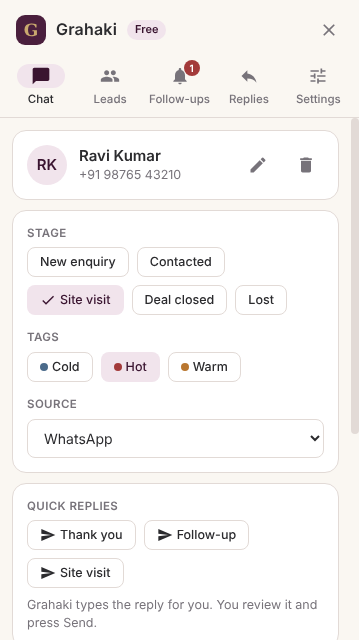
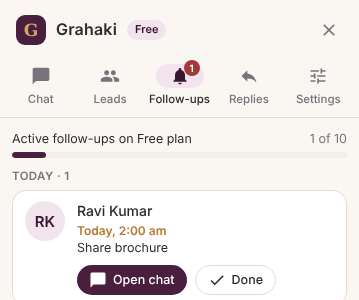
Three taps from chat to customer
No new app to learn. Grahaki lives next to the chats you already have.
Open a chat
Grahaki recognises the person and fills in their name and number where WhatsApp shows them.
Save it as a lead
Pick a stage, add a tag like Hot or Warm, and jot down what they need.
Follow up on time
Get a reminder when it's due. One click opens the chat with your reply already typed.
Everything a busy seller needs
Simple enough to use between calls. Organised enough to never lose a lead.
Leads from chats
Save any conversation as a lead with its source, stage and tags.
Sales pipeline
Move leads from enquiry to closed and see where every deal stands.
Follow-up reminders
Chrome notifications when a follow-up is due, plus a Today list.
Quick replies
Saved messages with the customer's name filled in. You review and press Send.
Notes and history
Budgets, requirements and every stage change, kept on the lead.
Your data, exportable
Download your leads to Excel or take a full backup at any time.
Set up for how you sell
Choose your business on the first screen and Grahaki prepares stages and replies to match.
Real estate
Brokers and channel partners juggling dozens of enquiries.
- Enquiry → Site visit → Deal closed
- Site-visit invite and follow-up replies
- Track budget and requirement in notes
Insurance & mutual funds
Advisors nurturing families over months.
- Lead → Proposal sent → Policy issued
- Renewal reminder replies
- Never miss a renewal follow-up
Education & coaching
Counsellors handling admission season.
- Enquiry → Counselled → Enrolled
- Demo class and admission replies
- Follow up before batches close
Built to keep your number safe
Many WhatsApp tools send bulk or automatic messages, which can get business numbers banned. Grahaki is deliberately different.
- You always press SendGrahaki types the reply; it never sends anything on its own.
- No bulk messaging, no auto-repliesNothing that puts your number at risk.
- We never read your messagesGrahaki only uses the name and number of the chat you have open.
- Your data stays yoursExport or delete everything at any time.
Questions
Will using Grahaki get my WhatsApp number banned?
Grahaki never sends messages automatically, never sends in bulk and doesn't change how WhatsApp works. Bans come from spam-like sending and user reports. As with any extension, we can't make promises on WhatsApp's behalf, but Grahaki is designed around WhatsApp's rules.
Does it work with WhatsApp Business?
Yes. Grahaki works with both WhatsApp and WhatsApp Business when you use them on WhatsApp Web in Google Chrome on a laptop or desktop.
Where is my data stored?
In the current version, your leads are stored only in Chrome on your computer. With Pro cloud backup, data will be stored on servers in India. See our privacy policy.
Is the free plan really free?
Yes. Free includes up to 100 leads, follow-up reminders, quick replies and Excel export, with no card needed.
Can I cancel Pro?
Yes, at any time. Pro stays active until the end of the year you've paid for, and new purchases can be refunded in full within 7 days. See refunds.
Be among the first to use Grahaki
We're opening on the Chrome Web Store soon. Email us and we'll send you early access.